> ## Documentation Index
> Fetch the complete documentation index at: https://docs.withdovetail.com/llms.txt
> Use this file to discover all available pages before exploring further.
# Device Label
> Create regulatory-compliant device identification displaying required safety and regulatory markings.
## Summary
The Device Label is a regulatory-compliant information display that contains all required identification, safety, and regulatory information for your medical device software. This label must be accessible within your software interface and includes essential elements like CE marking, UDI information, manufacturer details, and safety warnings required for market access and regulatory compliance.
## Why is Device Label important?
Device labeling is **legally mandated** for all medical devices and serves as the primary source of identification and safety information for users and regulatory authorities. The label ensures **traceability** throughout the device lifecycle and provides critical information that healthcare providers need to use your device safely and effectively. For software medical devices, the label must be electronically accessible and contain all the same regulatory information required for physical devices, demonstrating compliance with labeling regulations and enabling proper device identification in clinical settings.
## Regulatory Context
Under **21 CFR Part 801** (Labeling):
* **Device identification** (801.1) requires clear device identification and manufacturer information
* **Labeling requirements** (801.15) mandate specific information display
* **Software labeling** guidance requires electronic accessibility of label information
* **UDI requirements** (801 Subpart B) mandate unique device identification
**Special attention required for:**
* Software version identification and traceability requirements
* Electronic labeling accessibility for software-only devices
* Prescription device labeling requirements (Rx only designation)
* Integration with FDA Establishment Registration and Device Listing
Under **EU MDR 2017/745**:
* **GSPR 23** requires comprehensive device labeling information
* **Article 20** mandates CE marking for conformity assessment
* **Article 27** requires UDI system compliance and display
* **Annex I Chapter III** specifies detailed labeling requirements
**Special attention required for:**
* CE marking validity and notified body identification when required
* UDI-DI and UDI-PI display requirements for software versions
* Authorized representative information for non-EU manufacturers
* Multi-language requirements for different EU markets
## Guide
### Regulatory Marking Requirements
Your device label must display the **CE marking** prominently to indicate conformity with EU MDR requirements. The CE marking must be visible, legible, and indelible, which for software means it should be permanently accessible within the user interface. Include the medical device symbol to clearly identify your software as a medical device, helping users understand the regulatory status and intended medical purpose.
### Device Identification Information
Clearly display your **device name** exactly as specified in your technical documentation and regulatory submissions. Include the complete manufacturer name and address as registered with regulatory authorities. This information enables proper identification and contact for regulatory, safety, or support purposes. Ensure consistency between your label information and all other regulatory documentation.
### UDI System Compliance
Display both the **UDI-DI (Device Identifier)** and **UDI-PI (Production Identifier)** with appropriate symbols. The UDI-DI identifies your device model while the UDI-PI identifies the specific software version and release date. Format the UDI-PI according to established standards with proper identifiers for software version and release date. This enables complete traceability throughout the device lifecycle.
### Version and Release Information
Include the **software version number** and release date prominently on your device label. Use the version numbering scheme established in your Software Development and Maintenance Plan to ensure consistency across all documentation. The release date should match the date when the software version was made available to users, providing clear temporal identification for regulatory and support purposes.
### Instructions for Use Reference
Provide clear information about where users can access the **Instructions for Use (IFU)**. For software devices, this typically includes a web URL or electronic location where the complete IFU can be accessed. Use the appropriate symbol to indicate electronic instructions for use, helping users understand how to access complete usage information.
### Authorized Representative Information
If you are a non-EU manufacturer, include **authorized representative** information as required by MDR Article 11. Display the authorized representative symbol along with contact information for your EU-based representative. This enables EU authorities and users to contact a local representative for regulatory and safety matters.
### Safety Information Integration
Include appropriate **warnings and precautions** references on your device label. While the complete safety information is typically in your Instructions for Use, the label should direct users to review all warnings and precautions before use. This ensures users are aware of important safety considerations and know where to find complete safety information.
### Electronic Accessibility Requirements
For software medical devices, ensure your device label is **easily accessible** within the software interface. Consider placing it in an "About" section, settings menu, or help section where users can readily find it. The label should be accessible without requiring special permissions or administrative access, ensuring all users can view the regulatory information when needed.
## Example
### Scenario
You are creating a device label for your AI-powered diagnostic imaging software version 4.1.2 that analyzes chest X-rays and provides diagnostic recommendations to radiologists. The software is classified as Class IIa under EU MDR and is manufactured by MedTech Innovations Inc. based in California, with an authorized representative in Germany.
### Example Device Label
 *This product is a Class IIa medical device according to EU MDR 2017/745.*
 **ChestScan AI Pro**
 **(01)04012345678901(11)240315(10)4.1.2**
 **MedTech Innovations Inc.**
1234 Innovation Drive, Suite 100
San Francisco, CA 94105, USA
**MedTech Innovations Inc.**
1234 Innovation Drive, Suite 100
San Francisco, CA 94105, USA
 Software released on March 15, 2024
 Software version 4.1.2
 Instructions available for use at [https://www.medtechinnovations.com/chestscan-ifu](https://www.medtechinnovations.com/chestscan-ifu)
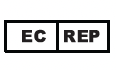 **European Authorized Representative:**
MedDevice Regulatory Services GmbH
Regulatory Affairs Department
Hauptstraße 123, 10115 Berlin, Germany
Tel: +49 30 12345678
Email: [regulatory@meddevice-services.de](mailto:regulatory@meddevice-services.de)
**Warnings and Precautions:**
Please refer to the instructions for use for a full listing of warnings and precautions.
## Q\&A
Place the device label in an easily accessible location such as an "About" section, settings menu, or help area. It should be available to all users without requiring special permissions and should be clearly labeled so users can find it when needed for regulatory or support purposes.
Update the device label for each software release to reflect the new version number, release date, and UDI-PI. Ensure the label information matches your updated release documentation and maintain consistency across all regulatory documents.
If you are an EU-based manufacturer, you don't need an authorized representative. If you are a non-EU manufacturer without an authorized representative, you cannot legally market your device in the EU under MDR. You must appoint an authorized representative before market access.
Use the complete legal manufacturer name and address as registered with regulatory authorities. Abbreviations may cause confusion and regulatory compliance issues. Ensure the information exactly matches your regulatory registrations and other official documentation.
For EU markets, the device label may need to be available in local languages depending on national requirements. Check specific country requirements and consider providing language selection options within your software interface for the device label display.
Update your device label immediately to reflect any UDI changes. Ensure the updated label is included in your software before release and verify that all regulatory databases are updated with the new UDI information to maintain proper traceability.
**European Authorized Representative:**
MedDevice Regulatory Services GmbH
Regulatory Affairs Department
Hauptstraße 123, 10115 Berlin, Germany
Tel: +49 30 12345678
Email: [regulatory@meddevice-services.de](mailto:regulatory@meddevice-services.de)
**Warnings and Precautions:**
Please refer to the instructions for use for a full listing of warnings and precautions.
## Q\&A
Place the device label in an easily accessible location such as an "About" section, settings menu, or help area. It should be available to all users without requiring special permissions and should be clearly labeled so users can find it when needed for regulatory or support purposes.
Update the device label for each software release to reflect the new version number, release date, and UDI-PI. Ensure the label information matches your updated release documentation and maintain consistency across all regulatory documents.
If you are an EU-based manufacturer, you don't need an authorized representative. If you are a non-EU manufacturer without an authorized representative, you cannot legally market your device in the EU under MDR. You must appoint an authorized representative before market access.
Use the complete legal manufacturer name and address as registered with regulatory authorities. Abbreviations may cause confusion and regulatory compliance issues. Ensure the information exactly matches your regulatory registrations and other official documentation.
For EU markets, the device label may need to be available in local languages depending on national requirements. Check specific country requirements and consider providing language selection options within your software interface for the device label display.
Update your device label immediately to reflect any UDI changes. Ensure the updated label is included in your software before release and verify that all regulatory databases are updated with the new UDI information to maintain proper traceability.